A home lab is your own private sandbox where you practice and make all the mistakes that you want without costing yourself or a company millions of dollars. One of my friends, Antigreencodes does social media for a living and one thing that he told me is that it is better to fail in private than in public because people on the internet will choose to remember the negative things first. Unfortunately, with many things, failure is a part of the learning process. That is why nobody wants a person that is just learning on a production server.
Home labs are also good for not wanting to rely on the cloud for everything. While many cloud platforms have free teirs they are usually limited in what they let you do. Also the fact that many of these large corporations will let you store data on their servers for free at the cost of them selling your data. Having a home lab gives you an area that is controlled by you alone. You also won’t be hit with a bill in the thousands at the end of the month, looking at you AWS.
I have an old PC, how old you may ask? well, about 12 years old. I built it back around 2013 and at the time it was considered a monster. Over the years I have been upgrading it, adding new hard drives, GPU’s and RAM. Even with the upgrading it can only go so far before it’s time for a new build. Eventually I had bought a Macbook Pro and I stopped using it and it just sat in a garage for a few years to collect dust. In the recent years, I started getting into Cyber Security and DevOps. While I was able to do a lot of the Linux operations on the Macbook, I wanted something else I could use as a dedicated server.
First thing when building your home lab is, you do not need to buy new hardware. Most people on Youtube and twitter can show you all these amazing builds that they made with their Raspberry PI’s. These build can be quite expensive depending on the setup. What I quickly found out, after a bit of research, is that you can get started for free. You can start your home lab with an old potato computer that you would have thrown away. I started looking at my own old laptops. I had a few Lenovo and HP laptops that were so old that they barely met the RAM and CPU requirements to run their current OS.
I went back to my garage and found my old trusty war machine. While it is well outperformed by some of today’s machines, it is still good enough to keep up with almost anything I have ever thrown at it. It ran a 78LMT-USB3 motherboard with 16 GB of DDR3 RAM, a Radeon RX 480, and an AMD 3750 FX Black edition. Back in it’s glory days I used it for school and gaming. After clearing the dust out and upgrading the RAM to 32 GB it came back to life and it was my same old machine running Windows 10.
What made me switch it over to my home lab machine is the fact that Windows 10 was no longer being supported by Microsoft. The current hardware build was not able to safely run on Windows 11 so I figured this would be a perfect time to install Linux. I previously had run a few Linux distros via dual booting but this time I was going all in. As a matter of fact I’m typing this on a Linux machine. If you haven’t ready my previous blog where I talked about switching to Linux, you would know how much of a big decision this was for me.
Online research has taught me that the location of your hardware is also an important part of your setup.
Table
Office
- Pros: close to devices and work area, few cables to run, fancy lights
- Cons: No home office, spending too much time in the office
Living Room
- Pros: Cool, lots of space, scifi movie feel, not isolated
- Cons: lots of traffic, could get damaged
Closet
- Pros: Easy Access, Stealthy, no more skeletons in the closet
- Cons: Poor ventilation = more heat, small space
Basement
- Pros: Usually Cooler
- Cons: may not have a basement, flooding, spiders, not handicap accessible
Attic
- Pros: Less noise, easier cable runs
- Cons: also not handicap accessible, can easily get hot, roof leaks, humidity and condensation
Garage
- Pros: Less noise in your house, out of the way
- Cons: Spiders, Lizards, Roaches, Oh My!, excess heat, dust, could require more cables, can get wrecked when parking the car or children playing
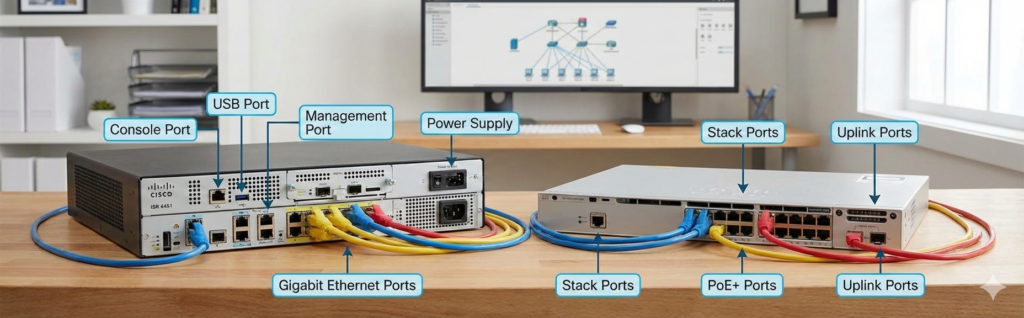
I opted for a home office setup because I already use it for my embedded systems projects. It’s become my all around R&D room. I actually started doing research on network diagrams in order to optimize my design. I prioritize maintaining a cool environment, using as little space as possible and leaving room for future expansions and upgrades. When you do this, pay attention to your floor plans and the materials of walls in your home.
Also if you are going to purchase cabinets and racks you should know that server racks and cabinets are usually deeper than network cabinets and racks. Network cabinets and racks also may not prioritize ventilation in the same way that server racks and cabinets do.
- Large, heavy servers, may require four sides on their racks or some sort of extra stability
- An open rack will provide better access or cabinet with removable sides would be useful
- An enclosed cabinet may need more cooling
- A cabinet may serve your needs better if the room is prone to dust
- closed cabinets usually look better if it’s in a living area, they also work better for security solutions especially if it has a lock
Using this setup I have using it to learn Linux, run virtual machines, and even deploy web servers locally via ssh. I even used other hardware outside my old pc like ESP32’s for some projects. I’ll be posting updates periodically to let you see the evolution.