Key takeaways
- Cross-site scripting (XSS) lets an attacker run their own JavaScript in your users' browsers, under your website's identity.
- There are three main forms: reflected, stored and DOM-based. Stored XSS has the widest reach because it affects every user who views the infected content.
- The primary defense is context-aware output encoding, supported by input validation, HTML sanitization, a Content Security Policy and hardened session cookies.
- Prevention is ongoing. Patching, dependency updates and regular security testing keep new vulnerabilities from slipping in.
Every search box, comment form, profile field and URL parameter on a website invites users to send data. Almost all of it is harmless. Cross-site scripting is what happens when an application mistakes some of that data for code.
XSS remains one of the most common weaknesses in web applications. MITRE catalogs it as CWE-79, and it appears in everything from small business websites to enterprise platforms. The good news is that it is also one of the most preventable, provided development teams apply the right controls consistently.
This guide explains how XSS attacks work, how the three main variants differ, what a successful attack costs a business, and the layered defenses every team should have in place.
What Is Cross-Site Scripting?
Cross-site scripting is a vulnerability in which an application places untrusted data into a web page without properly neutralizing it. When the page loads, the browser cannot tell the attacker's script apart from the site's legitimate code, so it runs it with the same privileges.
That means the injected script can typically:
- Read cookies and session tokens that are not protected
- View and change anything displayed on the page
- Submit forms and make requests as the logged-in user
- Redirect the user to another website
The name is partly historical. Early attacks focused on stealing data across sites, but the term now covers the injection of almost any script or markup into a trusted page.
How an XSS Attack Unfolds
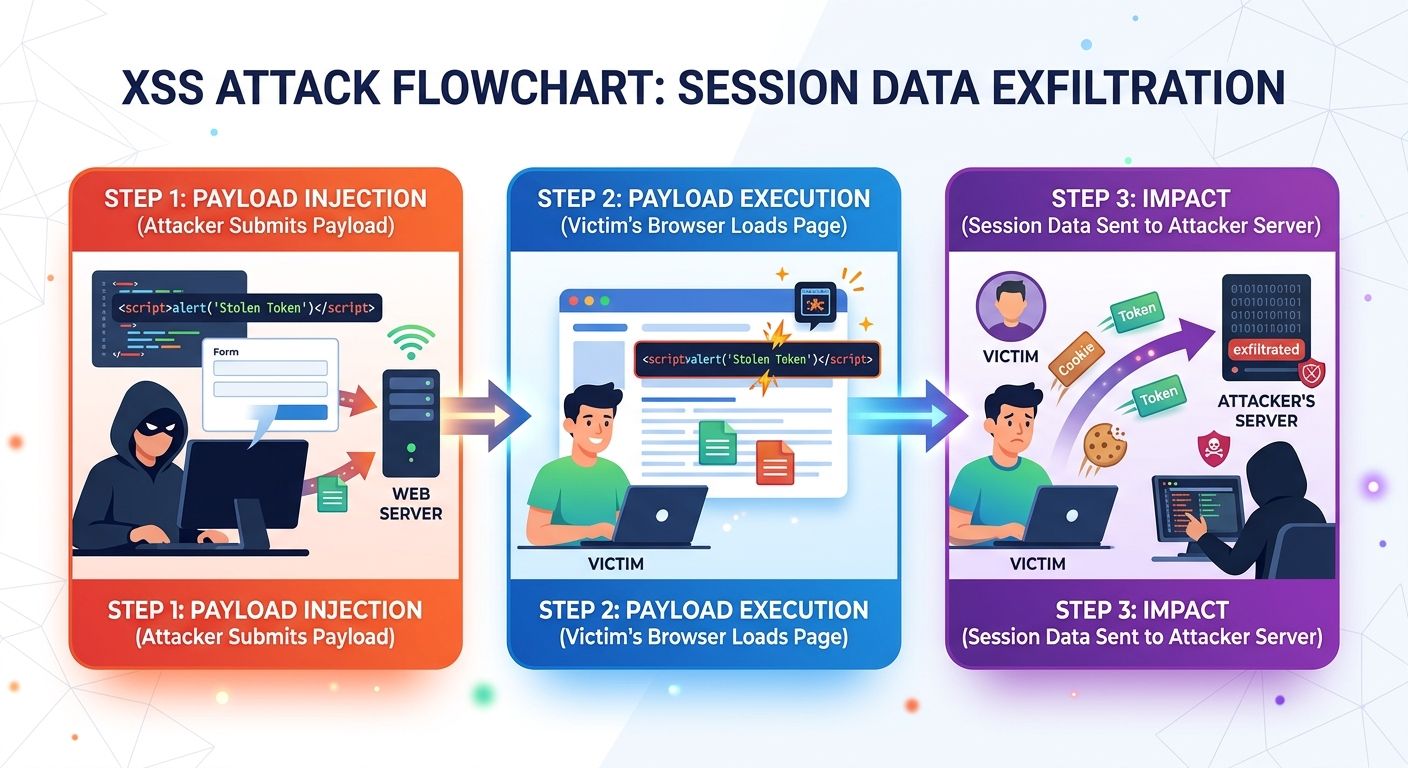
Most XSS attacks follow three phases.
- Injection. The attacker finds a place where user input reaches the page without being encoded. Common examples include search results pages, error messages, profile fields, comment sections and client-side scripts that read from the URL.
- Execution. A victim visits the affected page. Their browser treats the injected payload as part of the page and executes it.
- Impact. The script acts on the user's behalf. It may steal session data, perform actions in their account, alter page content or redirect them to a malicious site.
A simplified example makes this concrete. Consider a search page that echoes the user's query back to them:
<p>Results for: <?= $_GET['q'] ?></p>If an attacker sends a victim a link where the q parameter contains a <script> tag, the browser runs that script as if the website wrote it. The fix is to encode the value before it is written into the page:
<p>Results for: <?= htmlspecialchars($_GET['q'], ENT_QUOTES, 'UTF-8') ?></p>With encoding in place, characters such as < and > are displayed as text instead of being interpreted as HTML, and the payload is harmless.
The Three Types of XSS
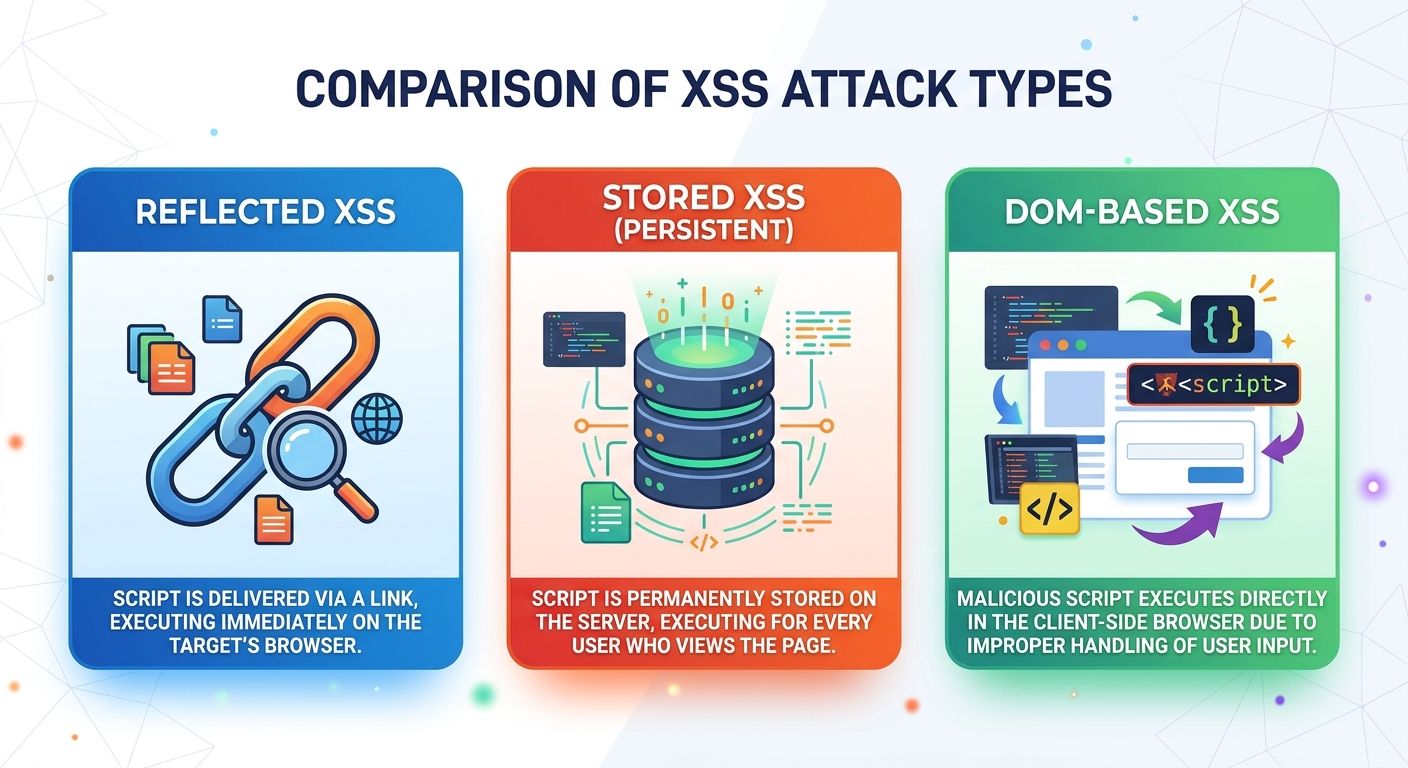
| Type | Where the payload lives | How it reaches the victim | Common entry points |
|---|---|---|---|
| Reflected XSS | In the request (URL or form data) | The victim opens a crafted link or submits a crafted form | Search results, error pages, redirects |
| Stored XSS | In the application's database | Any user who views the affected content | Comments, reviews, profiles, support tickets, forum posts |
| DOM-based XSS | In client-side JavaScript | Page scripts write untrusted data into the page | URL fragments, innerHTML, document.write, client-side routing |
Reflected XSS
The malicious input is included in a single request and immediately reflected back in the response. It is not saved anywhere, so the attacker has to persuade each victim to open a crafted link, usually through phishing emails, messages or social media.
Stored XSS
The malicious input is saved by the application, typically in a database, and later served to other users. Because the payload is delivered automatically to anyone who views the content, stored XSS does not depend on tricking individual victims. That makes it the most damaging variant in most applications.
DOM-based XSS
The vulnerability lives entirely in client-side code. JavaScript on the page reads data from a source the attacker controls, such as the URL, and writes it into the page in an unsafe way. Since the server may never see the payload, server-side defenses alone will not catch it.
Each variant requires its own defensive focus, which is why effective protection is layered rather than relying on a single filter.
Case Study: How Stored XSS Spreads Across a User Base
The following scenario is illustrative, but it reflects a pattern seen repeatedly in real applications.
A web platform allows users to post comments on articles. Comments are saved to the database and displayed to every visitor. The developers validate the comment length but do not encode the comment text when it is rendered on the page.
An attacker posts a comment that looks ordinary but contains a hidden script. From that moment on:
- Every visitor who views the article runs the attacker's script in their browser.
- The script quietly sends each visitor's session token to a server the attacker controls.
- The attacker uses those tokens to access accounts without needing any passwords.
- When a moderator or administrator reviews the comment, their privileged session is captured as well.
The attacker only had to act once. Ordinary browsing did the rest.
Lessons from this scenario:
- A single unencoded field can compromise every user who views it.
- Stored XSS does not need phishing. Normal use of the site triggers it.
- Administrator and moderator accounts are prime targets because they routinely review user-submitted content.
- The fix belongs at output: encode content when it is rendered, and sanitize any user-supplied HTML with a proven library.
What a Hands-On Test Revealed
To see how these attacks behave in practice, the techniques above were tested against an unfinished development project in a controlled local environment rather than a live website. Testing only systems you own, or are explicitly authorized to test, is essential.
The results show both how well modern frameworks protect applications and where gaps still appear:
- Framework defaults stopped the reflected attack. An attempt to inject a script through a URL parameter failed. The project was built on Laravel, whose Blade templating engine escapes output by default. That is output encoding doing its job with no extra code.
- An unsecured form allowed stored XSS. A form that saved input to the database without validation or sanitization accepted a script payload, which executed wherever that stored content was rendered without escaping.
- Client-side code created its own exposure. In a React interface, writing data directly into the DOM, outside React's default escaping, opened a path for DOM-based XSS.
- Older code is a blind spot. Because the project had not been touched in some time, it was not clear beforehand which protections were in place. Assumptions about forgotten code are not a security control; audits are.
The lesson: frameworks provide strong defaults, but vulnerabilities appear wherever developers step around those defaults or forget to apply them.
The Business Consequences of XSS
The severity of an XSS vulnerability depends on what the application holds and what its users can do. For any site with logins, personal data or payments, the consequences can be serious.
- Account hijacking. Stolen session tokens let attackers act as legitimate users, including administrators, without knowing their passwords.
- Data theft. Injected scripts can read anything the user can see, including personal information, account details and payment information entered on an affected page.
- Malware distribution and redirection. Compromised pages can redirect visitors to malicious websites or prompt them to download harmful files.
- Reputation damage. Customers who are attacked through your website lose trust in your brand. Depending on the data involved, an incident may also carry legal and regulatory obligations.
How to Prevent XSS: A Layered Defense
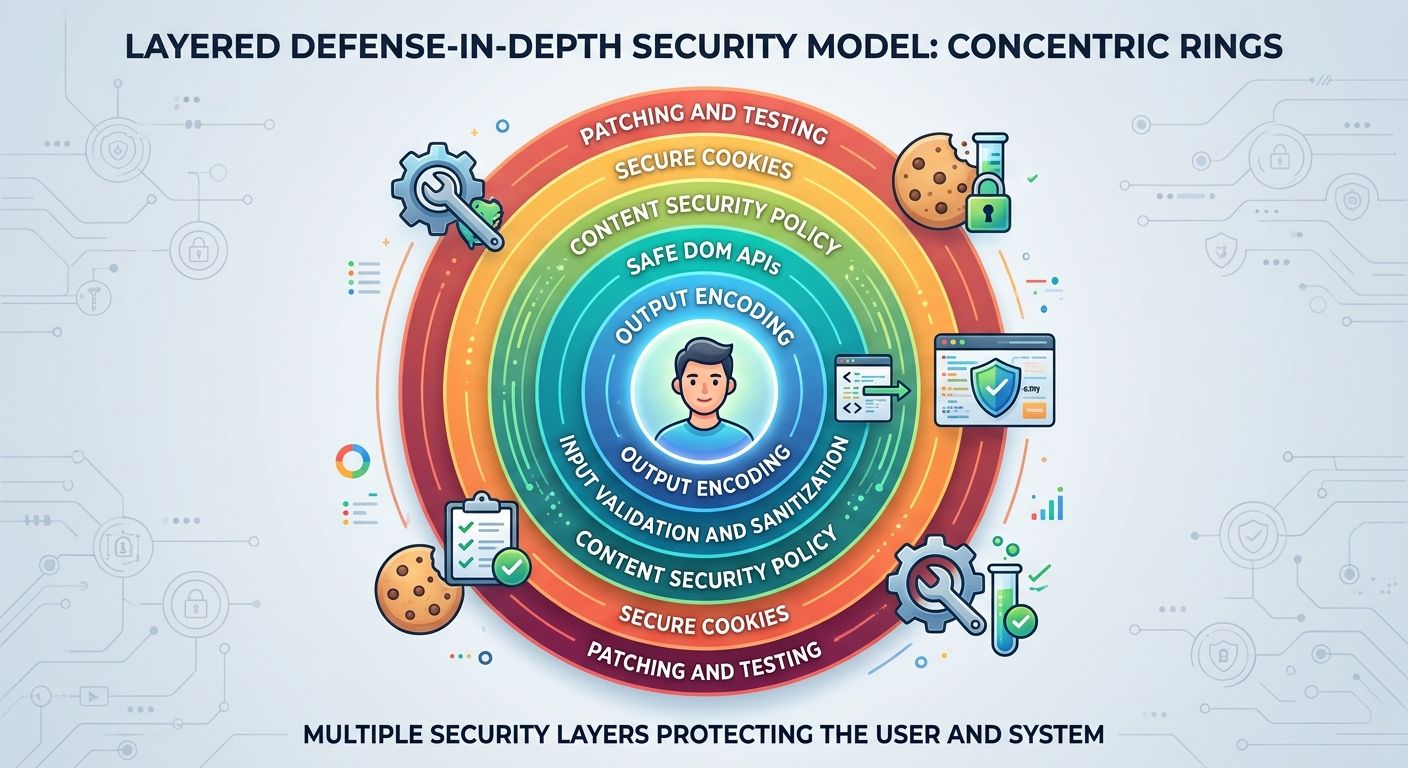
No single control eliminates XSS. The most reliable approach combines a primary defense with several supporting layers, so that a gap in one is caught by another.
1. Encode all output for its context
Output encoding is the primary defense against XSS. Before untrusted data is written into a page, convert characters that have special meaning into a safe form. The correct encoding depends on where the data is placed:
- HTML body: HTML entity encoding
- HTML attributes: attribute encoding, with attribute values always quoted
- JavaScript: JavaScript string escaping, though it is better to avoid placing untrusted data inside scripts at all
- URLs: URL encoding, plus validation that links use safe schemes such as
https:and neverjavascript:
Modern frameworks such as React, Angular, Vue and Django templates encode output automatically. Use that protection, and treat escape hatches such as dangerouslySetInnerHTML, v-html and innerHTML as high-risk code that requires review.
2. Validate input on the server
Input validation reduces what an attacker can submit in the first place:
- Use allowlists that define exactly which values or formats are acceptable.
- Check type, format and length. Limiting input length reduces room for complex payloads.
- Always validate on the server. Client-side checks improve the user experience but can be bypassed.
Validation is an important supporting layer, but it is not sufficient on its own. Many legitimate inputs, such as names with apostrophes or free-text comments, contain characters that must still be encoded on output.
3. Sanitize any HTML you allow
If users can submit rich text, such as formatted comments or content from a WYSIWYG editor, use a well-maintained sanitization library (DOMPurify is a widely used option) that strips anything outside an approved list of tags and attributes. Avoid writing custom regex filters, which attackers routinely bypass.
4. Use safe DOM APIs
In client-side code, prefer textContent over innerHTML when displaying user data, and avoid document.write and eval. Where browser support allows, the Trusted Types API can enforce safe handling of dangerous DOM sinks.
5. Deploy a Content Security Policy
A Content Security Policy (CSP) is an HTTP response header that tells the browser which scripts are allowed to run. A strict, nonce- or hash-based policy can block injected scripts even when another defense fails. Roll it out in report-only mode first to identify issues before enforcing it. CSP is a safety net, not a replacement for encoding.
6. Harden sessions and limit access
Set the HttpOnly, Secure and SameSite attributes on session cookies. HttpOnly in particular prevents JavaScript from reading the cookie, which limits what a successful XSS attack can steal.
Strong authentication and authorization controls limit the damage further. When accounts, especially administrator accounts, have only the permissions they need, a hijacked session exposes far less. Requiring re-authentication for sensitive actions, such as changing a password or payment details, means a stolen session alone is not enough. These controls do not prevent XSS, but they reduce what an attacker can do with it.
7. Keep software and dependencies updated
Many XSS vulnerabilities are found in third-party components such as CMS plugins, themes and JavaScript libraries rather than in custom code.
- Apply security patches promptly.
- Monitor vendor advisories and vulnerability databases.
- Use automated dependency scanning to flag vulnerable packages.
- Remove plugins and libraries that are no longer used.
8. Test regularly
Vulnerabilities are far cheaper to fix before attackers find them.
- Include automated security scanning in your CI/CD pipeline.
- Review code with a focus on output points and DOM sinks.
- Commission periodic penetration tests, especially after major releases or redesigns.
XSS Prevention Checklist
- All dynamic output is encoded for its context (HTML, attribute, JavaScript, URL)
- Framework auto-escaping is enabled, and every bypass is reviewed
- Input is validated on the server with allowlists and length limits
- User-supplied HTML is sanitized with a maintained library
- Client-side code uses safe DOM APIs
- A Content Security Policy is deployed and monitored
- Session cookies use HttpOnly, Secure and SameSite
- CMS, plugins and dependencies are patched and scanned
- Security testing runs in CI/CD and through periodic penetration tests
Frequently Asked Questions
What is the most effective way to prevent XSS? Context-aware output encoding is the most effective single control. It should be combined with input validation, HTML sanitization, a Content Security Policy and secure cookie settings for defense in depth.
Is input validation enough to stop XSS? No. Validation reduces the attack surface, but legitimate data often contains characters that are dangerous in certain contexts. Output must still be encoded where it is rendered.
Do modern frameworks prevent XSS automatically? They prevent many common cases by encoding output by default. Vulnerabilities still occur when developers bypass that protection, render raw HTML, build URLs from user input or manipulate the DOM directly.
Which type of XSS is the most dangerous? Stored XSS is usually the most damaging because it affects every user who views the infected content, without requiring any victim to click a malicious link.
Don't browsers block XSS automatically? Not reliably. Some browsers once included built-in XSS filters, but the major browsers have since removed them. Protection has to come from the application itself, through encoding, sanitization and a Content Security Policy.
Conclusion
Cross-site scripting persists because it hides inside ordinary features: a search bar, a comment box, a profile page. Preventing it is less about a single tool and more about discipline. Treat all data as untrusted until it has been encoded for the place it appears, then layer validation, sanitization, a Content Security Policy, secure cookies, timely patching and regular testing on top.
Teams that build these habits into their development process close off one of the most common paths attackers use to reach their users.
Concerned about XSS or other vulnerabilities in your web application? Webtech Ninjas provides secure development services to help you find and fix weaknesses before attackers do. Contact us to schedule an assessment.