My Nextjs site now runs on a $7 a month AWS Lightsail server, deploys itself every time I push to main, and costs me less than a large pizza. No Kubernetes. No autoscaling group. No surprise bill that makes you question every life decision since 2019.
This is a small Next.js app that's still in development. It doesn't need an enterprise environment, it needs a reliable box, HTTPS, and a way to ship updates without me babysitting a terminal. Here's why I picked Lightsail, what the setup looks like, and the stuff that broke along the way so you don't have to learn it the hard way.
Why not Vercel
Vercel is great until you read the fine print. The free Hobby plan is meant for personal, non-commercial projects. This site is for my agency, so commercial use isn't a maybe, it's the whole point. That pushes you onto a paid plan that's priced per team member, and that's a lot of money for a site that mostly serves a homepage and a contact form.
To be fair, Vercel's developer experience is elite. Push code, get a URL, done. But I'd rather learn how the sausage gets made and pay less for the privilege.
Why not EC2 and autoscaling
EC2 with an autoscaling group and a load balancer is like hiring a full security detail for a lemonade stand. It works, but the load balancer alone costs more per month than my entire setup, and I'd be managing VPCs, security groups and scaling policies for an app with roughly zero concurrent users.
Lightsail is AWS with the training wheels on in a good way. You get a VM, a static IP, a firewall and DNS in one console at a flat monthly price. The tradeoff is you do a little more Linux yourself: Nginx, SSL, a process manager. For me that's a feature, not a bug. The managed alternatives I looked at started around $12 a month or more for something that doesn't need to scale.
If this app ever blows up, Lightsail can move to EC2 through a snapshot. I'll cross that bridge when traffic forces me to.
How it fits together
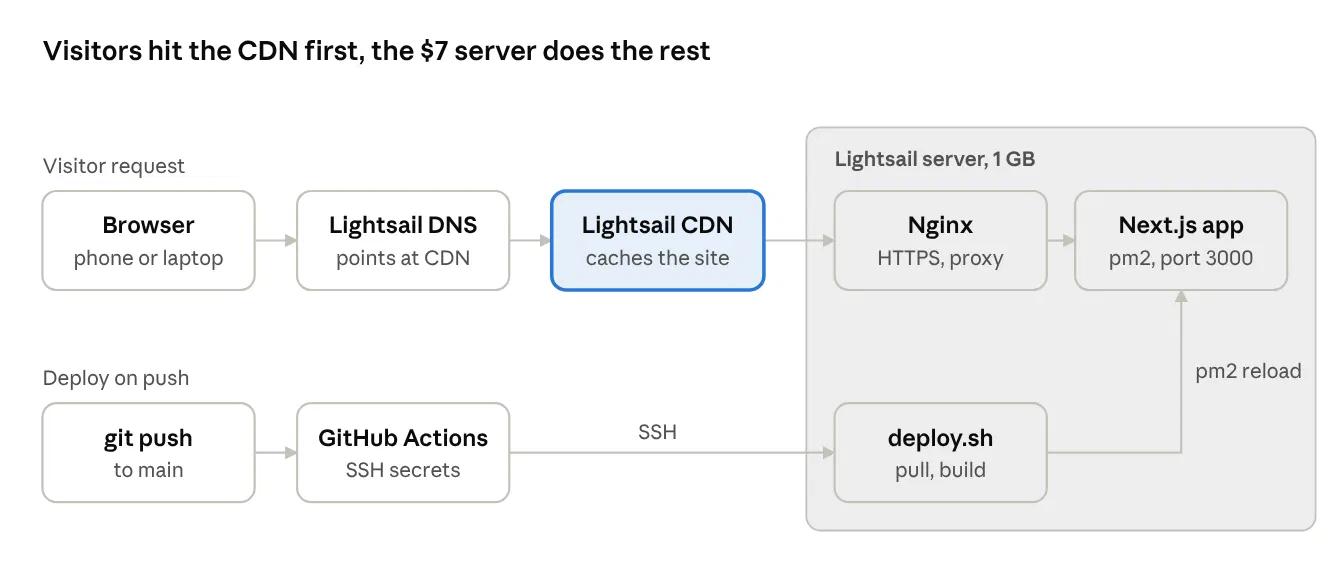
Two paths, one server. Visitors hit DNS, then Nginx handles HTTPS and hands the request to Next.js. Deploys come in from GitHub over SSH and end with pm2 reloading the same app.
[embed: node/efe231f6-f8ae]
The server setup
The whole thing took one evening. Here's the short version.
1. Create the instance. In Lightsail: Linux, OS only, Ubuntu LTS, the $7 plan with 1 GB of RAM. Create a static IP and attach it, then open ports 22, 80 and 443 in the firewall.
2. Connect from
your own terminal. Lightsail gives you a browser SSH button, but I wanted to work from my local terminal. Download the default key (a .pem file) from your Lightsail account page, lock it down, and connect:
chmod 400 ~/Downloads/LightsailDefaultKey-<region>.pem
ssh -i ~/Downloads/LightsailDefaultKey-<region>.pem ubuntu@<your-static-ip>
No password, key only. Keep that .pem file private. Never commit it, never paste it anywhere.
3. Add swap. This one's non negotiable. A Next.js build on 1 GB of RAM will get killed by the out of memory reaper faster than a red shirt on Star Trek. Two gigs of swap fixes it:
curl -o- https://raw.githubusercontent.com/nvm-sh/nvm/master/install.sh | bash
source ~/.bashrc
nvm install --lts
npm install -g pm2
sudo apt install -y nginx git
4. Install the tools. Node LTS through nvm, pm2 to keep the app alive, plus Nginx and git:
curl -o- https://raw.githubusercontent.com/nvm-sh/nvm/master/install.sh | bash
source ~/.bashrc
nvm install --lts
npm install -g pm2
sudo apt install -y nginx git
5. Build and run the app. Clone the repo into ~/app, run npm ci and npm run build, then hand it to pm2:
pm2 start npm --name app -- start
pm2 save
pm2 startup   # run the sudo command it prints
Now the app survives crashes and reboots without me touching it.
6. Put Nginx in front. Nginx listens on 80 and 443 and forwards traffic to Next.js on localhost:3000. The key part of the config:
server {
    listen 80;
    server_name webtechninjas.com www.webtechninjas.com;

    location / {
        proxy_pass http://localhost:3000;
        proxy_http_version 1.1;
        proxy_set_header Upgrade $http_upgrade;
        proxy_set_header Connection 'upgrade';
        proxy_set_header Host $host;
        proxy_set_header X-Forwarded-For $proxy_add_x_forwarded_for;
        proxy_set_header X-Forwarded-Proto $scheme;
        proxy_cache_bypass $http_upgrade;
    }
}
Delete the default site or you'll be staring at "Welcome to nginx!" wondering where your life went wrong.
7. Free HTTPS. Certbot grabs a Let's Encrypt certificate, edits the Nginx config for you, redirects HTTP to HTTPS, and renews automatically:
sudo apt install -y certbot python3-certbot-nginx
sudo certbot --nginx -d webtechninjas.com -d www.webtechninjas.com
8. DNS. The domain stays registered at Namecheap, but I moved DNS into a free Lightsail DNS zone. Two A records (@ and www) point at the static IP, and Namecheap's nameservers get swapped to the four AWS ones Lightsail gives you. Pro tip: copy over any MX and TXT records before you switch, or your email quietly dies.
Push to deploy with GitHub Actions
SSHing in to deploy by hand gets old by the third time. So every push to main now ships itself. Two pieces make it work: a deploy script on the server and a workflow in the repo.
The deploy script lives at ~/deploy.sh:
#!/bin/bash
set -e
exec 9>/tmp/deploy.lock
flock -n 9 || { echo "Deploy already running"; exit 1; }
cd ~/app
git pull
npm ci
npm run build
pm2 reload app
Two lines do the heavy lifting. set -e bails at the first error, so a broken build never replaces the working site. flock makes sure two deploys can't run at the same time and trip over each other.
The keys stay secret. I generated a dedicated deploy key on the server, added the public half to authorized_keys, and stored the private half in GitHub under Settings, Secrets and variables, Actions as SSH_KEY, with the server IP as SSH_HOST. Secrets are encrypted and masked in logs, so nothing sensitive shows up in the repo or the Actions output.
ssh-keygen -t ed25519 -f ~/.ssh/github_deploy -N ""
cat ~/.ssh/github_deploy.pub >> ~/.ssh/authorized_keys
The workflow at .github/workflows/deploy.yml:
name: Deploy
on:
  push:
    branches: [main]

concurrency:
  group: deploy
  cancel-in-progress: false

jobs:
  deploy:
    runs-on: ubuntu-latest
    steps:
      - uses: appleboy/ssh-action@v1
        with:
          host: ${{ secrets.SSH_HOST }}
          username: ubuntu
          key: ${{ secrets.SSH_KEY }}
          script: |
            export NVM_DIR="$HOME/.nvm"
            . "$NVM_DIR/nvm.sh"
            ~/deploy.sh
Those two nvm lines look like filler. They are not. A non interactive SSH session doesn't load your .bashrc, so without them the job can't find npm or pm2 and fails with "command not found." Ask me how I know.
Now my workflow is: write code, push, grab a snack, refresh the site. I also added a static IP and CDN for a little extra speed. The Actions tab shows every deploy, and a failed one can be re run with one click.
| Symptom | Cause | Fix |
|---|---|---|
| 502 Bad Gateway | The app isn't running | pm2 status, then pm2 restart app |
| "Welcome to nginx!" page | Default site still enabled | Remove /etc/nginx/sites-enabled/default and reload Nginx |
| npm: command not found in Actions | nvm not loaded in the SSH session | Add the two nvm lines to the workflow script |
| deploy.sh: No such file or directory (exit 127) | Script missing on the server | Recreate ~/deploy.sh and chmod +x it |
| "Another next build process is already running" | Stale build lock | If nothing is building: rm -f .next and redeploy |
| Build gets killed | Out of memory | Check free -h and make sure swap is on |
| git pull denied | Private repo, server has no read access | Add a read only display key under the repo's Deploy keys |
One more: npm ci will yell about vulnerabilities. Don't run npm audit fix --force on the server. That's how you turn a warning into an outage. Review it on your own machine instead.
Making it faster on mobile
A cheap server is only half the story. On a phone with two bars of signal, every extra kilobyte hurts, so I made two changes.
Put a CDN in front. I added a Lightsail CDN distribution, which runs on Amazon CloudFront under the hood. It caches the whole site on edge servers around the world, so a visitor in California isn't waiting on a round trip to one box in Virginia. My domain now points at the distribution instead of the server, and the server only gets hit when the cache needs a refresh. The intro plan is free for 12 months, then $2.50 a month for 50 GB of transfer.
The catch with caching the whole site: a deploy isn't live for visitors until the cache refreshes. If your push "didn't work," it probably did. Reset the distribution cache in the Lightsail console, or automate it as the last step of the deploy.
Converted images to WebP. WebP files are typically much smaller than the JPEGs and PNGs they replace at the same visual quality. Smaller images mean faster loads on mobile data, which is exactly where most local business visitors are browsing from.
The lesson here: before you pay for a bigger server, make the stuff you're sending smaller and closer to the user. It's cheaper and it usually helps more.
What it costs and what I'd tell you
The whole stack runs about $7 to $8 a month for the deploy and $2.50 for the CDN.
| Item | Monthly Cost |
|---|---|
| Lightsail Instance 1 GB | $7.00 |
| Static IP (attached) | $0.00 |
| CDN | $2.50 |
| Lightsail DNS Zone | $0.00 |
| Let's Encrypt Certificate | $0.00 |
| Github Actions, light use | $0.00 |
| Snapshots, if enabled | under $1.00 |
| Billed yearly | Billed yearly |
If you're shipping a small app that isn't paying the bills yet, you don't need a platform that scales to a million users. You need a box that stays up, a lock icon in the browser bar, and a deploy that happens when you push. Lightsail plus Nginx, certbot and a GitHub Action gets you all three for less than a streaming subscription.
Next up on my list: turning on automatic snapshots and unattended security updates, and adding a database when the app actually needs one. Future me will thank present me. Probably.