TL;DR: Docker Desktop has a nasty architecture mismatch problem on Apple Silicon that breaks native-binary packages like LightningCSS. Podman is a drop-in replacement that runs ARM64 containers natively - no QEMU, no Rosetta, no chaos. If you're on an M1/M2/M3 Mac, skip the pain and start here.
The Setup (and the Dream)
I was building a classic full-stack app — Next.js 14 on the frontend, FastAPI in the middle, Postgres at the bottom — and I wanted the whole thing containerized. Clean dev environment, reproducible builds, easy onboarding for anyone who clones the repo. Simple enough, right?
The stack looked like this:
- Next.js 14 (App Router + Tailwind + Turbopack)
- FastAPI (Python 3.11)
- Postgres 15
- Docker Compose for orchestration
Containerization made total sense here. Consistent environments across machines, clean separation of frontend/backend/db, and no more "it works on my machine" nightmares. The plan was airtight.
Then Docker happened.
The Problem: Docker Desktop + M1 Mac = Pure Chaos
Architecture Mismatch Hell
Here's the thing about Docker Desktop on Apple Silicon — it defaults to x86_64 emulation. And many modern packages ship platform-specific native binaries. When those two facts meet, you get a mess of EBADPLATFORM errors, missing .node binaries, and containers that build halfway and die with no useful error message.
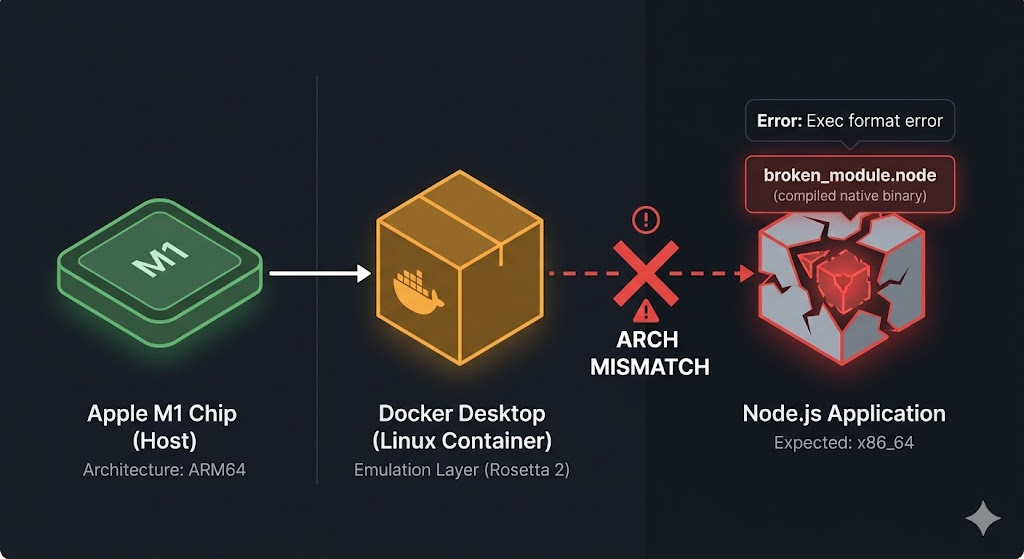
Your M1 chip is ARM64. Docker is secretly trying to run x86. Everything downstream hates that.
LightningCSS: The Canary in the Coal Mine
The first thing that broke — loudly — was LightningCSS. Next.js uses it under the hood for CSS processing, and LightningCSS ships platform-specific Rust binaries. That's the whole problem in one sentence.
Inside a Docker container on an M1 Mac, you get errors like:
Could not resolve module "/app/node_modules/lightningcss/lightningcss.linux-arm64-gnu.node"
Or the even more fun variant where it can't find the x64-musl binary because Docker's emulation confused itself about what architecture it even is. You're not going crazy — the binary literally isn't there, or it's the wrong one, or the wrong libc variant loaded. Delightful.
FastAPI Wasn't Having It Either
The Python side wasn't much better. Uvicorn refused to start cleanly, Python wheels were mismatching architectures, and the container would crash silently. The /docs endpoint — the one thing FastAPI is famous for — returned ERR_CONNECTION_RESET. You'd check the logs and find nothing useful. Classic Docker M1 experience.
And Postgres? Slow and Moody
ARM vs x86 image confusion, slow startup under emulation, random connection resets. Nothing catastrophic, but enough to make you feel like you're debugging on hard mode.
The Debugging Rabbit Holes (a.k.a. the Hours I'll Never Get Back)
Before I found the actual fix, I went through every obvious workaround:
Forcing AMD64 with platform: linux/amd64
services:
web:
platform: linux/amd64
Result: LightningCSS ARM64 errors just flipped to AMD64 errors. Different flavor of broken. Still broken.
Disabling LightningCSS via optimizeCss: false
Doesn't matter. npm install runs before Next.js ever reads your config, so the binary is already missing before your override does anything.
The Nuclear Option: Rebuilding Everything
rm -rf node_modules
npm install --force
docker compose build --no-cache
Tried it. Watched it fail again. Felt things.
The real realization was this: the code was fine. Docker Desktop was the problem.
The Breakthrough: Switching to Podman
Why Podman Actually Works on M1
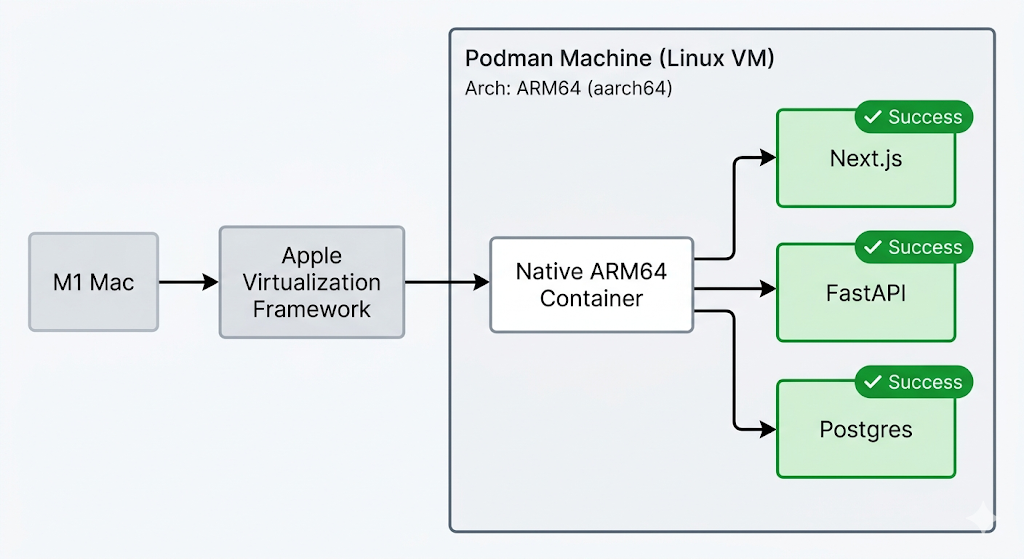
Podman runs native ARM64 Linux containers on Apple Silicon. No QEMU emulation, no Rosetta translation layer, no architecture confusion. When you tell Podman to build a container on your M1, it builds an ARM64 container — because you're on ARM64 hardware. That's it. That's the whole secret.
LightningCSS installs cleanly. Python wheels resolve correctly. Postgres starts fast. It's not magic, it's just the right tool for the hardware.
Installing Podman
If you have Homebrew:
brew install podman
podman machine init
podman machine start
That's it. Podman spins up a lightweight Linux VM using the Apple Virtualization Framework — which is hardware-accelerated, not emulated — and runs your containers inside it natively.
Using Podman Compose
The best part: it's a drop-in replacement. Swap this:
docker compose up --build
For this:
podman compose up --build
No Compose file changes needed. No new syntax to learn. Same commands, same flags, same muscle memory.
Removing All the Hacks
Once you're on Podman, you can delete every workaround you accumulated:
- Remove
platform: linux/amd64from your Compose file - Remove any LightningCSS overrides from
next.config.js - Remove
--forceflags from your npm scripts - Stop nuking your
node_modulesevery other hour
The Final Working Setup
After switching to Podman, here's what a clean, minimal docker-compose.yml (yes, Podman reads it natively) looks like for this stack:
version: "3.9"
services:
web:
build: ./frontend
ports:
- "3000:3000"
depends_on:
- api
api:
build: ./backend
ports:
- "8000:8000"
depends_on:
- db
environment:
- DATABASE_URL=postgresql://user:password@db:5432/appdb
db:
image: postgres:15
ports:
- "5432:5432"
environment:
- POSTGRES_USER=user
- POSTGRES_PASSWORD=password
- POSTGRES_DB=appdb
volumes:
- pgdata:/var/lib/postgresql/data
volumes:
pgdata:
Results after switching:
| Service | Status | Status on Podman |
|---|---|---|
| Next.js (LightningCSS) | Broken, missing .node binary | Builds cleanly, ARM64 binary resolves |
| FASTAPI/Uvicorn | Silent crashes, ERR_CONNECTION_RESET | Starts cleanly, /docs works |
| Postgres 15 | Slow start, connection resets | Fast, stable, native ARM image |
| Overall compose stack | Needed platform hacks + cache clearing | Zero hacks, zero overrides |
Lessons Learned (the Hard Way)
1. Docker Desktop is still not reliable on Apple Silicon for dev environments that use native modules. This isn't a niche edge case. LightningCSS, esbuild, sharp, better-sqlite3 — if your stack touches any native binary packages, you're going to hit this.
2. Podman is a genuine drop-in replacement. The commands are identical. The Compose files work as-is. There's no real migration cost — it's mostly brew install podman and a few machine init commands.
3. Native ARM containers are the correct approach on M-series Macs. Running x86 emulation on ARM hardware for development is like driving with the parking brake on. It technically works, but you're fighting the machine every step of the way.
4. When the tool fights you, consider switching tools. There's a temptation to out-stubborn the problem. I spent hours trying to fix Docker when the actual fix was a 10-minute Podman install.
Conclusion
If you're on an M1, M2, or M3 Mac and you're containerizing a modern web stack, do yourself a favor and start with Podman. You'll skip every error in this post, and your dev environment will run the way it's supposed to — fast, clean, and native.
The Docker brand is strong, but on Apple Silicon, it's carrying around a lot of x86 baggage that just doesn't belong on your machine.
FAQ
Why does Docker Desktop fail on M1 Macs? Docker Desktop uses x86_64 emulation by default on Apple Silicon. Packages that ship platform-specific native binaries (like LightningCSS or esbuild) break because the binary architecture doesn't match the emulated environment.
Does Next.js work with Podman? Yes, perfectly. Podman runs native ARM64 containers, so Next.js — including LightningCSS and Turbopack — installs and builds without any platform hacks.
How do I run FastAPI on an M1 Mac in a container? Use Podman. brew install podman, podman machine init, podman machine start, then use podman compose up --build exactly like you'd use Docker Compose.
Is Podman better than Docker for Apple Silicon? For local development on M-series Macs — yes, significantly. Podman runs native ARM64 containers using the Apple Virtualization Framework, while Docker Desktop relies on x86 emulation that causes architecture mismatches with native binary packages.